
AI Artist & Tech Enthusiast
How to Turn a Photo into Anime Style — Free AI Tool | ArtRobot
The anime aesthetic has taken over social media -- from TikTok's Studio Ghibli filter trend to viral AI-generated anime portraits flooding Instagram. But most "anime filters" slap a generic cartoon overlay on your face and call it a day. Turning a photo into anime style with real neural style transfer is fundamentally different. ArtRobot uses museum-sourced Ukiyo-e woodblock print references -- the actual artistic ancestor of modern anime -- to produce results grounded in centuries of Japanese visual tradition rather than a disposable Instagram filter.
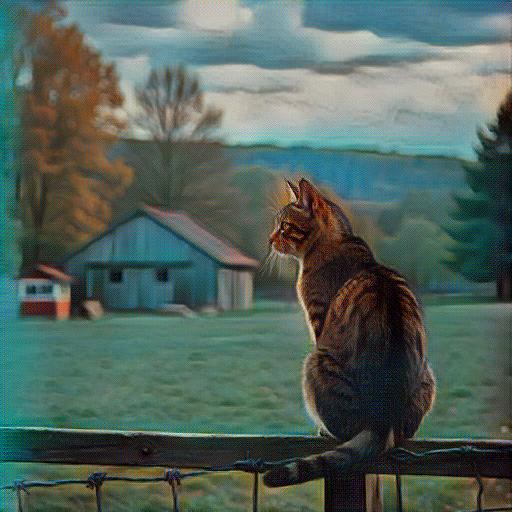 A landscape photograph transformed into Ukiyo-e style using ArtRobot AI -- the woodblock print tradition that directly inspired anime's visual language
This guide walks you through the full process in three steps, explains why Ukiyo-e style transfer produces more authentic anime aesthetics than generic filters, and shares tips for getting the best results from your photos.
Why Anime Style Transfer Is So Popular
Anime's visual DNA traces directly back to Ukiyo-e woodblock prints from Japan's Edo period (1603-1868). Osamu Tezuka, the father of modern manga, openly cited Hokusai's compositional techniques as foundational influences. The flat color planes, bold outlines, dramatic perspective, and nature motifs you see in Studio Ghibli films are modernized Ukiyo-e principles.
That lineage matters for style transfer. When you use a tool that references actual Hokusai and Hiroshige woodblock prints -- not a cartoon overlay algorithm -- you get results that carry the authentic visual weight of the tradition anime descended from. The difference between a "photo to anime" filter and museum-referenced neural style transfer is the difference between a photocopy and an oil painting.
ArtRobot tested its Ukiyo-e style across 1,740 evaluations using the ArtFID quality benchmark, scoring 207.12 on landscapes (5-star rating) and 69.27 on fantasy subjects (5-star rating). These are among the highest quality scores in the entire 116-style library for those categories.
What You'll Need
- A photo -- portrait, landscape, pet, or any subject you want to transform. JPG, PNG, and WEBP all work.
- A web browser -- ArtRobot runs entirely in-browser, no app download or installation needed.
- Free credits -- new users get free credits to try multiple styles before committing to a plan.
That is it. No drawing tablet, no Photoshop, no artistic skill required.
Step 1: Upload Your Photo
Head to ArtRobot and upload the photo you want to transform into anime style. Drag-and-drop or use the file picker -- both work on desktop and mobile.
Tips for Best Anime Results at Upload
Not every photo translates equally well into anime style. Here is what matters:
- Bold compositions work best. Anime thrives on dramatic framing -- a figure silhouetted against a sunset, a mountain path winding into mist, a close-up face with expressive eyes. Simple, strong compositions produce the most striking anime results.
- Clean backgrounds help. Ukiyo-e prints used negative space deliberately. A cluttered background fights the style transfer. If possible, shoot against sky, water, or simple scenery.
- Natural light over flash. Soft, directional light creates the tonal gradients that translate beautifully into Ukiyo-e's layered color blocks. Harsh flash flattens everything.
- Landscapes are a sweet spot. ArtRobot's Ukiyo-e style scored 207.12 (5-star) on landscapes -- mountains, coastlines, forests, and cityscapes all produce exceptional anime-style results.
- Aim for 1200px+ resolution. Higher resolution gives the neural network more detail to work with, producing cleaner lines and more refined color transitions.
| Original Photo | Ready for Anime Style Transfer |
|---|---|
 |
Upload via drag-and-drop or file picker |
| Clear, well-composed photo -- ideal for anime style | Supports JPG, PNG, WEBP |
Step 2: Choose Your Anime Style
This is where ArtRobot differs from every other "photo to anime" tool. Instead of a single generic anime filter, you choose from museum-sourced style references that represent the actual artistic tradition behind anime.
Recommended Styles for Anime Aesthetics
| Style | ArtFID Score | Best For | Why It Works |
|---|---|---|---|
| Ukiyo-e | 207.12 (landscapes) | Landscapes, nature, cityscapes | The direct ancestor of anime -- Hokusai's wave, Hiroshige's rain, authentic woodblock aesthetic |
| Ukiyo-e (Fantasy) | 69.27 | Fantasy scenes, characters | 5-star quality on imaginative subjects -- Studio Ghibli-like atmosphere |
| Ukiyo-e (Flowers) | 109.11 | Botanical, garden scenes | Delicate line work meets vibrant flat color -- classic anime background aesthetic |
| Ukiyo-e (Portraits) | 265.20 | Face close-ups, selfies | Stronger stylization effect for dramatic character portraits |
Ukiyo-e on landscapes (ArtFID 207.12, 5-star) is our top recommendation for anime-style results. The style captures exactly what makes anime backgrounds so visually distinctive: layered color planes that create depth without photorealistic rendering, bold compositional lines, and a palette that balances vibrancy with atmospheric subtlety. When Hayao Miyazaki's background painters create those breathtaking Ghibli landscapes, they are drawing from the same Ukiyo-e tradition these style references encode.
For portrait and selfie subjects, the Ukiyo-e portrait style (ArtFID 265.20) applies stronger stylization -- flattening skin tones into clean color blocks and emphasizing eye and hair details, which is closer to the anime character aesthetic most people are looking for.
Browse the full Anime Art Style collection on ArtRobot to see all available references. You can preview the result before downloading.
| Original Landscape | Ukiyo-e Anime Style Applied |
|---|---|
|
|
| Original photograph | ArtFID: 207.12 -- 5-star quality on landscapes |
| Original Portrait | Ukiyo-e Anime Style Applied |
|---|---|
 |
 |
| Original photograph | Bold stylization with flat color planes and expressive line work |
Step 3: Fine-Tune and Download
Once the AI generates your anime-style result, you can:
- Preview at full resolution before downloading
- Try additional styles -- switch between Ukiyo-e variants to find the best match for your specific photo
- Download in multiple sizes -- social media resolution for Instagram and TikTok, or print-ready resolution for posters and wall art
The entire process takes 5-15 seconds. The AI preserves your original aspect ratio -- no awkward cropping.
Tips for Best Anime Results
-
Landscapes outperform portraits. ArtRobot's Ukiyo-e style scores 207.12 on landscapes versus 265.20 on portraits (lower is better). If you want the most polished anime result, start with a landscape or outdoor scene.
-
Try fantasy subjects. With an ArtFID of 69.27 (5-star), fantasy-themed images produce the highest quality Ukiyo-e results in our entire benchmark. Cosplay photos, fantastical settings, and imaginative compositions all excel.
-
Embrace the flat aesthetic. Anime style transfer is not trying to look photorealistic -- it is replacing photographic rendering with the flat color planes and bold outlines that define Japanese visual art. Photos with strong shapes and clear subjects lean into this strength.
-
Pair with nature. Ukiyo-e masters like Hokusai and Hiroshige specialized in natural subjects -- waves, mountains, cherry blossoms, cranes. Photos featuring natural elements connect most directly with the style's strengths.
-
Compare before sharing. Side-by-side before/after comparisons perform exceptionally well on social media. The visual contrast between a photograph and its anime-style transformation is inherently shareable.
FAQ
What is the difference between an anime filter and AI style transfer?
An anime filter applies a uniform preset overlay to your photo -- smoothing skin, enlarging eyes, adding a generic color shift. AI style transfer using neural networks actually recomposes your image in the visual language of a specific art tradition. ArtRobot references real Ukiyo-e woodblock prints from museum collections, so the result carries the authentic visual weight of the art form that anime descended from. The difference is immediately visible in the quality and uniqueness of the output.
Can I turn a selfie into anime style?
Yes. Upload any selfie to ArtRobot and select the Ukiyo-e style. Portrait subjects receive strong stylization -- flattened skin tones, emphasized eyes and hair, bold outlines -- which closely matches the anime character aesthetic. For best results, use a well-lit selfie with a simple background. See our Turn Selfie into Art guide for detailed tips.
Is the anime style transfer free?
ArtRobot provides free credits for new users, so you can try the anime style transfer on multiple photos without paying. Free results include a full preview and downloadable image. Paid plans are available for bulk transformations or higher resolution outputs.
How is Ukiyo-e related to anime?
Ukiyo-e ("pictures of the floating world") is the Japanese woodblock print tradition from the Edo period that directly influenced the development of manga and anime. Osamu Tezuka, the father of modern manga, cited Hokusai's compositional techniques as a major influence. The flat color planes, bold outlines, dramatic perspective, and nature motifs that define anime's visual identity are modernized Ukiyo-e principles. Using Ukiyo-e style references produces results that are historically authentic rather than algorithmically generic.
Does this work on mobile?
Absolutely. ArtRobot runs entirely in your web browser -- no app installation required. Open artrobot.ai on your phone, upload directly from your camera roll, select the Ukiyo-e style, and download your anime-style result. The interface is fully optimized for both iPhone and Android.
Related Tutorials
- Anime Art Style -- Explore the full anime and Ukiyo-e style collection
- Turn Photo into Cartoon -- Bold outlines and flat colors for a different cartoon aesthetic
- Ukiyo-e Style Transfer -- Deep dive into the Japanese woodblock print tradition
- Pop Art Style Transfer -- Vibrant, graphic transformations for shareable results
- How to Turn a Selfie into Art -- Portrait-specific tips and style recommendations
Turn Your Photo into Anime Style Now
Ukiyo-e scored 5-star quality ratings on landscapes (207.12), fantasy (69.27), and flowers (109.11) in our 116-style benchmark -- making it one of the highest-performing styles in ArtRobot's entire library. Upload a photo and see the authentic anime aesthetic for yourself.
Turn Your Photo into Anime Style Free on ArtRobot ->
Explore More
Try It Yourself
Transform your own photos into stunning paintings with 80+ artist styles. Free to start.