
AI Artist & Tech Enthusiast
How to Turn a Pet Photo into Art: Step-by-Step Guide
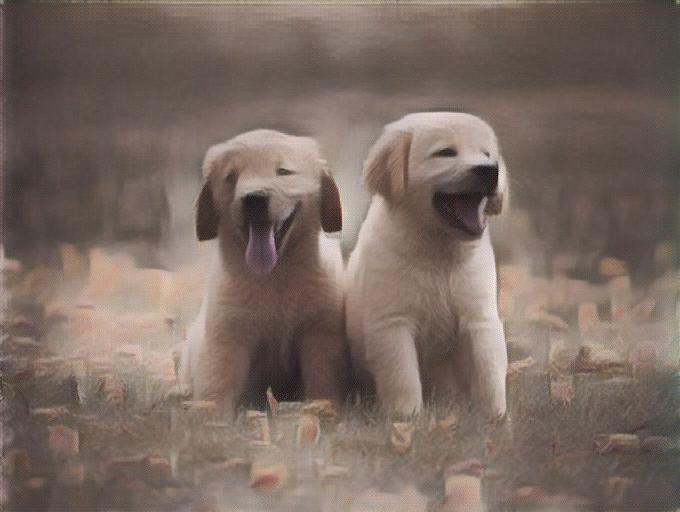
Whether it is a golden retriever mid-zoomie or a cat judging you from the couch, turning a pet photo into art transforms an everyday snapshot into something you would actually hang on a wall. ArtRobot's AI style transfer applies 117+ museum-tested art styles to any pet photograph in seconds -- no drawing skills, no Photoshop, no commission artist. We tested every style on animal photography using our ArtFID quality benchmark across 1,740 evaluations, so you can pick the style that genuinely works best for your furry subject.
A pet photograph transformed into a Romanticism-style painting using ArtRobot AI
This guide walks you through the entire process in three steps, recommends the top-performing art styles for pet photos based on real data, and shares practical tips for getting the best possible result.
Step 1: Upload Your Pet Photo
Head to ArtRobot and upload a photo of your pet. The AI works with dogs, cats, birds, rabbits -- any animal subject. JPG, PNG, and WEBP formats are all supported.
How to Take the Best Pet Photo for Style Transfer
Not all pet photos transfer equally well. Animal photography scored a mean ArtFID of 306.86 across 116 styles in our benchmark -- higher than portraits or landscapes -- which means photo quality matters even more for pets. Here is what makes a difference:
- Get close. Fill 60-70% of the frame with your pet. Tight crops give the neural network more fur texture and facial detail to work with, which directly improves the artistic output.
- Use natural light. Soft window light or outdoor shade creates the kind of tonal gradation that Romantic and Impressionist painters spent their careers chasing. Avoid harsh flash, which flattens depth.
- Shoot at eye level. Crouch down to your pet's height. Eye-level perspective produces more emotionally engaging portraits, and the AI preserves that intimacy in the styled result.
- Keep the background simple. A cluttered room behind your dog competes with the style transfer. A plain wall, grass, or a solid-color blanket lets the AI focus entirely on your pet.
- Capture a still moment. Blurry motion shots lose detail. Wait for a calm pause -- the post-nap stretch, the focused stare at a treat -- and shoot in burst mode to catch a sharp frame.
| Original Pet Photo | Uploaded to ArtRobot |
|---|---|
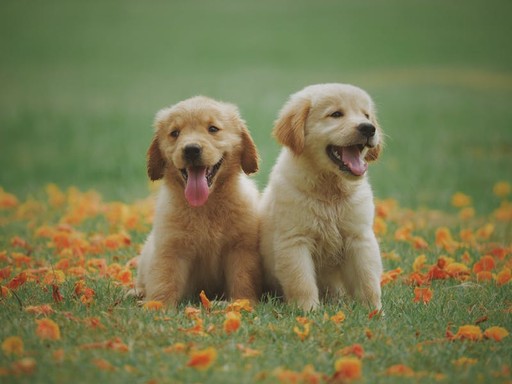 |
Upload via drag-and-drop or file picker |
| Clear, well-lit pet photo -- ideal for style transfer | Supports JPG, PNG, WEBP |
Step 2: Choose an Art Style
This is where the magic happens. ArtRobot offers 117+ art styles, but not all of them perform equally well on animal subjects. Our ArtFID benchmark tested every style specifically on animal photography -- lower ArtFID means better quality.
Top 5 Recommended Styles for Pets
| Rank | Art Style | ArtFID Score | Why It Works for Pets |
|---|---|---|---|
| 1 | Romanticism | 166.26 | Warm golden light and atmospheric depth make fur glow |
| 2 | Symbolism | 168.69 | Dreamlike softness adds mystical aura to animal portraits |
| 3 | Abstract Art | 172.02 | Bold color fields turn pets into modern art statements |
| 4 | Impressionism | ~195 | Loose brushwork mimics fur texture naturally |
| 5 | Pop Art | ~210 | Vibrant flat colors create fun, shareable pet portraits |
Romanticism (ArtFID 166.26) is the clear winner for pet photos. The style originated with painters like Caspar David Friedrich and J.M.W. Turner, who built their entire visual language around luminous atmosphere and emotional warmth -- exactly the qualities that make a pet portrait feel alive rather than filtered. The neural network translates your pet's fur into rich, painterly brushstrokes with a golden warmth that looks like a commissioned oil painting.
Symbolism (ArtFID 168.69) is a close second. Its soft-focus, dreamlike quality wraps your pet in an almost ethereal glow, which works particularly well for cats and animals with dark fur where you want to preserve mystery while adding artistic depth.
For something bolder, Baroque (ArtFID 186.12) brings dramatic chiaroscuro lighting -- one side of your pet's face illuminated, the other falling into rich shadow -- echoing the same technique Rembrandt used on his human subjects.
Browse the full style library on ArtRobot, or try one of these top performers. You can preview the result before committing.
| Original Pet Photo | Romanticism Style Applied | Impressionism Style Applied |
|---|---|---|
|
|
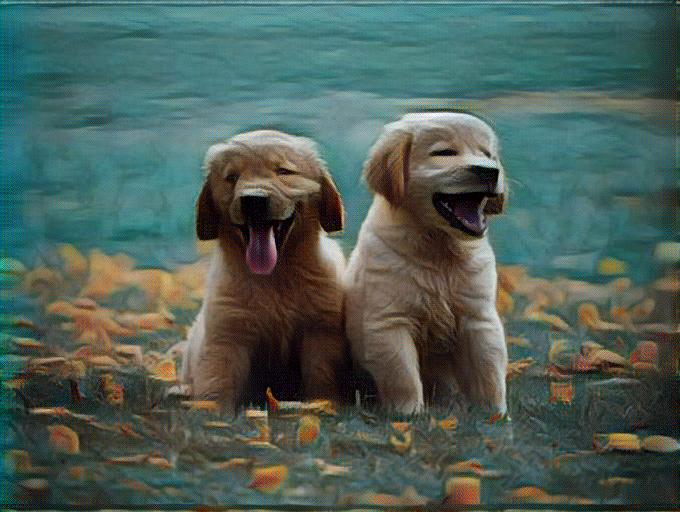 |
| Original photograph | ArtFID: 166.26 -- Best for pets | Soft brushwork mimics fur beautifully |
Step 3: Download Your Pet Art
Once you are happy with the preview, hit Download. ArtRobot generates your pet art in multiple resolutions:
- Social media size -- perfect for Instagram posts, Facebook profile pictures, or sharing in pet communities
- Print-ready resolution -- high enough quality to print on canvas, phone cases, mugs, or framed wall art
- Original aspect ratio -- the AI preserves your photo's dimensions, no awkward cropping
The entire process takes seconds. No account required for your first free creation.
Best Art Styles for Pet Photos
We benchmarked 116 art styles on animal photography. Here is the full top 10 ranking by ArtFID quality score (lower is better):
| Rank | Art Style | ArtFID | Visual Effect on Pets |
|---|---|---|---|
| 1 | Romanticism | 166.26 | Warm golden atmosphere, painterly fur |
| 2 | Symbolism | 168.69 | Dreamlike softness, ethereal glow |
| 3 | Abstract Art | 172.02 | Bold color fields, modern art feel |
| 4 | Mark Rothko | 172.81 | Color-field warmth, contemplative mood |
| 5 | Color Field | 172.81 | Saturated blocks, graphic impact |
| 6 | Toulouse-Lautrec | 180.06 | Sketchy energy, expressive line work |
| 7 | Baroque | 186.12 | Dramatic chiaroscuro, oil painting richness |
| 8 | Surrealism | 188.37 | Fantastical distortion, conversation starter |
| 9 | Post-Impressionism | 192.00 | Vivid color, bold outline, Van Gogh feel |
| 10 | Expressionism | 193.18 | Raw emotion, intense color, visible brushwork |
Styles to Avoid for Pet Photos
Not every art style translates well to animal subjects. Based on our testing, these styles consistently produce poor results on pets:
- Gustave Dore -- ArtFID 544.19: Heavy cross-hatching designed for book illustrations destroys fur texture
- Paolo Veronese -- ArtFID 537.89: Renaissance fresco palette clashes with organic animal forms
- Rococo -- ArtFID 493.55: Ornamental excess overwhelms the pet subject
- William Hogarth -- ArtFID 493.55: Satirical caricature style distorts animal anatomy
- Ernst Ludwig Kirchner -- ArtFID 484.66: Angular Expressionist geometry fragments natural curves
The pattern is clear: styles built around geometric rigidity or heavy line engraving conflict with the soft, organic forms of animals. Styles emphasizing atmosphere, color, and painterly brushwork consistently produce the best pet art.
Tips for the Best Results
-
Try multiple styles. Your first choice might not be the best match. A fluffy white cat might look stunning in Symbolism but flat in Baroque. Experiment with 3-4 styles to find the sweet spot.
-
Match the mood to the pet. A dignified Great Dane suits Baroque's dramatic gravitas. A playful kitten works better with Pop Art's bright energy. A sleeping cat is perfect for Symbolism's dreamy softness.
-
Use portrait-orientation photos. Vertical crops that center on your pet's face tend to produce more visually striking results than wide landscape shots with lots of background.
-
Higher resolution in, higher quality out. ArtRobot's neural network preserves the detail it receives. A 1200px+ image gives the AI enough texture information to produce genuinely painterly fur and whisker detail.
-
Print it. Pet art looks ten times better printed on canvas than viewed on a phone screen. The painterly textures and brushwork reveal themselves at physical scale. Many online print services accept the high-resolution download directly.
FAQ
Do I need artistic skills to turn a pet photo into art?
No artistic skills are needed. ArtRobot's AI handles the entire artistic transformation automatically. You upload a photo, choose from 117+ pre-tested art styles, and the neural network generates the stylized result in seconds. The most important "skill" is taking a well-lit, clear photo of your pet -- the AI does everything else.
Is it free to turn a pet photo into art with ArtRobot?
Yes. ArtRobot offers free credits for new users, so you can try multiple styles on your pet photos without paying. Free results include a preview and downloadable image. For bulk projects or higher resolution outputs, paid plans are available.
What image format works best for pet photos?
JPG and PNG both work well. JPG is the default format from most phone cameras and is perfectly fine. If your phone supports shooting in PNG or HEIC, these preserve slightly more detail. The most important factor is not the format but the image quality -- good lighting, sharp focus, and at least 1200px on the longest edge will produce the best pet art.
Can I turn a pet photo into art on my phone?
Absolutely. ArtRobot runs entirely in your web browser -- no app download needed. Open artrobot.ai on your phone, upload directly from your camera roll, pick a style, and download the result. The interface is optimized for mobile, so the experience is seamless on iPhone and Android.
How long does it take to turn a pet photo into art?
The AI generates your pet art in approximately 5-15 seconds depending on image size and server load. There is no queue or waiting period. Upload, choose a style, and your result appears almost instantly.
Related Guides
- Impressionism Style Transfer -- The classic painterly look, ranked among the best for pet photos
- Pop Art Style Transfer -- Bold, colorful pet portraits for social sharing
- Cubism Style Transfer -- Abstract geometric interpretations of your pet
- Ukiyo-e Style Transfer -- Japanese woodblock print style for unique pet art
- Art Nouveau Style Transfer -- Flowing organic lines that complement animal forms
Turn Your Pet into Art Now
Romanticism scored the best ArtFID (166.26) on animal photography across our entire 116-style benchmark -- but the right style depends on your pet's personality and the look you want. Upload a photo and try a few styles to find the one that makes you smile.
Turn Your Pet Photo into Art Free on ArtRobot ->
Explore More
Try It Yourself
Transform your own photos into stunning paintings with 80+ artist styles. Free to start.