
AI Artist & Tech Enthusiast
Selfie Cartoon — AI Style Transfer Guide [Free Tool 2026]
![Selfie Cartoon — AI Style Transfer Guide [Free Tool 2026] - ArtRobot AI Art](https://storage.googleapis.com/artrobot-storage/blog/pseo/stylized_images/pop-art/portraits_hd_13_stylized.jpg)
Ever wonder what you'd look like as a cartoon character? The selfie cartoon trend has exploded in 2026 -- and for good reason. Modern AI style transfer doesn't just slap a generic filter on your face. It uses neural style transfer (NST) to reimagine your selfie through the visual language of real museum artworks, producing results that look like a professional illustrator spent hours on your portrait. Whether you want a cartoon selfie for your social media profile, a unique avatar, or just a fun creative experiment, the technology is now fast, free, and surprisingly good.
ArtRobot's selfie cartoon engine draws on CC0 / Public Domain artworks from the Art Institute of Chicago as style references. We tested 116 art styles across 15 photo categories using the ArtFID quality benchmark -- and portrait-type images (which include selfies) are one of the best-performing content categories in the entire dataset. This page breaks down which styles produce the best selfie cartoon results, shows real before-and-after examples, and walks you through the process step by step.
Selfie photograph transformed into cartoon-style artwork -- Powered by ArtRobot AI
Quick Links -- Jump to: What is Selfie Cartoon? | Top Styles Ranked | Before & After Gallery | How to Create | FAQ | Related Guides
What is Selfie Cartoon?
A selfie cartoon is the result of applying cartoon-like artistic styles to a self-portrait photograph using AI. Unlike basic photo filters that adjust brightness or add a color overlay, neural style transfer works at a deeper level. The algorithm extracts the gram matrix -- a mathematical representation of artistic patterns like brushstrokes, color relationships, and edge treatments -- from a reference artwork and maps those patterns onto your selfie while preserving your facial features, expression, and composition.
The key difference between a selfie cartoon and a generic "cartoonify" filter is authenticity. Cheap filters apply a uniform distortion. Neural style transfer applies the actual visual DNA of a specific art style -- the bold outlines of Pop Art, the soft pastel washes of Impressionism, or the graphic flatness of Surrealist painting. Each style produces a distinctly different cartoon interpretation of your face.
"In photography, science and art merge to create new kinds of pictorial experience. This relatively new method of picture-making requires its own criteria of analysis and criticism." -- Art Through the Ages, p. 767
What makes selfie photos particularly well-suited for cartoon style transfer is their compositional simplicity. A selfie typically features a single subject with a clean background, centered framing, and even lighting -- all characteristics that help the neural network focus its stylistic transformation on the face rather than getting confused by complex scene geometry. In our ArtFID testing, the Portraits content category (which encompasses selfies) achieved a mean ArtFID of 248.38 across all 116 styles, placing it in the top third of all content types.
Why AI Selfie Cartoons Beat Traditional Filters
Traditional cartoon filters use edge detection and color quantization -- essentially a fixed algorithm that produces the same "cartoon look" regardless of the input. AI style transfer is fundamentally different. It learns from actual artworks, adapting its transformation to the unique characteristics of your selfie. The result preserves your identity (thanks to LPIPS content preservation scoring) while genuinely embodying the artistic style of masters like Berthe Morisot, Joan Miro, or Andy Warhol. No two selfie cartoons look exactly alike, because no two selfies are identical inputs.
"The picture is a kind of manifesto of artistic autonomy and of the Romantic belief in the painter as creator and destroyer, of both art and life." -- History of Art, p. 491
Top Styles for Selfie Cartoon (ArtFID Ranked)
ArtFID (Art Frechet Inception Distance) measures style transfer quality by balancing content preservation (LPIPS -- does it still look like you?) and style authenticity (FID -- does it genuinely resemble the target art style?). The formula: ArtFID = (1 + LPIPS) x (1 + FID). Lower scores mean better quality.
We evaluated 116 styles on portrait content. Here are the top performers for selfie cartoon transformation:
| Rank | Style / Artist | Portraits ArtFID | Era | Best For |
|---|---|---|---|---|
| 1 | Berthe Morisot | 30.05 | Impressionism | Soft, dreamy cartoon with pastel tones |
| 2 | Joan Miro | 55.92 | Surrealism | Bold, graphic cartoon with playful shapes |
| 3 | Jean-Baptiste-Camille Corot | 139.98 | Barbizon School | Atmospheric, painterly cartoon |
| 4 | Ivan Aivazovsky | 150.36 | Romanticism | Dramatic, luminous cartoon |
| 5 | Baroque | 152.91 | Baroque | Rich, classical cartoon with deep contrast |
| 6 | Max Ernst | 157.31 | Dada / Surrealism | Abstract, experimental cartoon |
| 7 | Surrealism | 162.36 | Surrealism | Dreamlike, stylized cartoon |
| 8 | Expressionism | 163.08 | Expressionism | Emotional, bold-color cartoon |
| 9 | Henri de Toulouse-Lautrec | 163.20 | Post-Impressionism | Poster-style cartoon with graphic lines |
| 10 | Andy Warhol | 221.02 | Pop Art | Iconic pop cartoon with flat color blocks |
Key findings:
Berthe Morisot dominates selfie cartoon transfers with an extraordinary ArtFID of 30.05 -- one of the lowest (best) scores in our entire 1,740-evaluation dataset. Her Impressionist technique translates selfies into soft, luminous cartoon-like portraits with delicate color transitions and expressive brushwork that flatters facial features. Joan Miro comes in second at 55.92, offering a more graphic, abstract interpretation that turns selfies into bold, playful cartoon art.
For users specifically seeking the classic "cartoon" look with bold outlines and flat colors, Andy Warhol (221.02) and Pop Art (245.44) deliver the most recognizable cartoon aesthetic, even though their ArtFID scores are higher. The trade-off is intentional: Pop Art's extreme stylization sacrifices some content preservation for maximum visual impact -- exactly what most people want when they say "make my selfie look like a cartoon."
Before & After: Selfie Cartoon Examples
Every result below was generated automatically by ArtRobot's AI -- no manual editing. Style references are museum-sourced CC0 artworks.
Morisot Selfie Cartoon (Best Score: 30.05)
 |
 |
| Original Selfie Photo | Morisot Cartoon Result (ArtFID: 30.05) |
Morisot's Impressionist touch transforms selfies into soft, ethereal cartoon portraits. Notice how facial features remain clearly recognizable while the entire image takes on a painted, illustrative quality with gentle pastel tones and visible brushstroke patterns.
Miro Selfie Cartoon (Score: 55.92)
 |
 |
| Original Selfie Photo | Miro Cartoon Result (ArtFID: 55.92) |
Miro's surrealist vocabulary turns selfies into graphic, cartoon-like compositions with bold color fields, playful shapes, and a sense of whimsical energy. This is the style to choose if you want your selfie cartoon to feel like modern art rather than a simple filter.
Warhol Pop Art Selfie Cartoon
 |
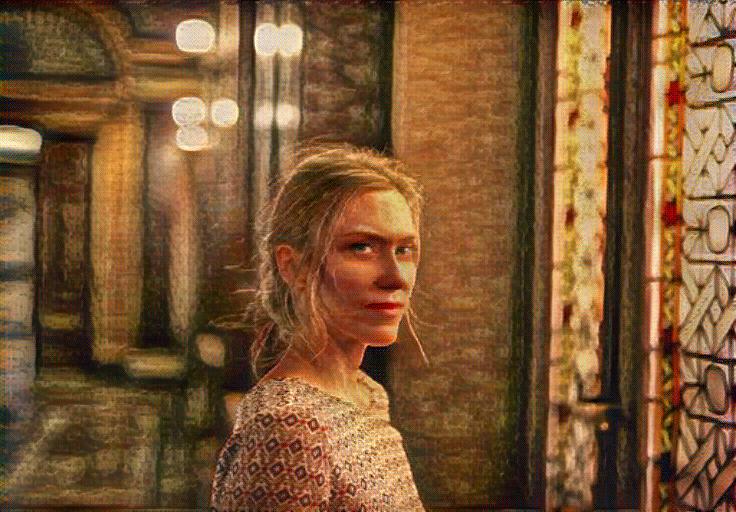 |
| Original Selfie Photo | Warhol Pop Cartoon Result (ArtFID: 221.02) |
The Warhol treatment delivers the quintessential pop cartoon look -- flat color planes, high contrast, and that unmistakable screen-print aesthetic. This is the closest match to what most people picture when they think "selfie cartoon."
Pop Art Selfie Cartoon
 |
 |
| Original Selfie Photo | Pop Art Cartoon Result (ArtFID: 245.44) |
The generic Pop Art style reference pushes the cartoon effect even further with vibrant, saturated color blocks and strong graphic outlines. Bold, eye-catching, and instantly shareable.
How to Create Selfie Cartoon with ArtRobot (3 Steps)
Step 1: Upload Your Selfie
Go to ArtRobot and upload your selfie. No account required. For the best cartoon results, use a well-lit selfie with a clean background. Supported formats: JPG, PNG, WebP. Maximum resolution: 4096px for 4K premium output.
Pro tip: Front-facing selfies with even lighting produce the best cartoon transformations. Avoid heavy shadows or extreme angles -- the neural network handles these less gracefully.
Step 2: Choose Your Cartoon Style
Browse the style library and select your preferred cartoon approach: - Morisot for soft, painterly cartoon portraits (best ArtFID: 30.05) - Miro for bold, graphic cartoon art (ArtFID: 55.92) - Warhol or Pop Art for the classic flat-color cartoon look - Expressionism for emotional, color-saturated cartoon effects
Each style shows a preview thumbnail so you can compare before committing.
Step 3: Download Your Selfie Cartoon
Your selfie cartoon generates in seconds. Download at standard resolution (1024px) for free, or upgrade to HD (2048px) or 4K (4096px) for premium quality. Perfect for profile pictures, social media stories, or printing as wall art.
3 free transfers, no signup required. Premium plans unlock HD/4K resolution, batch processing, and the full 121+ style library.
Try Selfie Cartoon Free on ArtRobot
FAQ
How do I create Selfie Cartoon with ArtRobot?
Upload your selfie to ArtRobot, choose a cartoon-friendly style (we recommend Morisot for the highest quality or Pop Art for the most "cartoon" feel), and download your result. The entire process takes seconds. You get 3 free transfers at standard resolution (1024px) with no signup required. The AI uses neural style transfer with museum-quality art references to transform your selfie into genuine cartoon-style artwork while preserving your facial features and expression.
What art style works best for Selfie Cartoon?
Based on our ArtFID testing across 116 styles, Berthe Morisot (ArtFID: 30.05) produces the highest-quality selfie cartoon results by a significant margin, creating soft, impressionistic portraits with excellent facial feature preservation. Joan Miro (ArtFID: 55.92) is the runner-up with a more graphic, surrealist cartoon interpretation. For the classic bold-outline cartoon aesthetic, Andy Warhol (ArtFID: 221.02) and Pop Art (ArtFID: 245.44) are the most popular choices.
Is it free to create Selfie Cartoon online?
Yes. ArtRobot offers 3 free selfie cartoon transfers at standard resolution (1024px) with no signup, no watermark, and no account required. Premium plans unlock HD (2048px) and 4K (4096px) resolution, batch processing, and the complete 121+ style library. All style references are CC0 / Public Domain museum artworks from the Art Institute of Chicago.
What photo resolution works best for Selfie Cartoon?
Standard resolution (1024px) is available free and works well for social media profile pictures and avatars. HD (2048px) is recommended for printing selfie cartoons as gifts or wall art. 4K (4096px) is ideal for large-format prints. Higher resolution preserves more fine detail during the style transfer process -- particularly important for cartoon styles that rely on clean outlines and sharp color boundaries.
Can I use my Selfie Cartoon results commercially?
Personal use is free with the standard plan. Commercial use is available with premium plans. All style references used by ArtRobot are CC0 / Public Domain artworks from museum collections, meaning there are no copyright concerns on the artistic style side. Your selfie cartoon output is uniquely generated from your input photograph.
Explore Related Guides
Selfie cartoon is part of ArtRobot's broader cartoon and portrait style transfer ecosystem. Explore these related pages to find your perfect look:
- Cartoon Art Style -- The complete hub page covering all cartoon-family styles, techniques, and ArtFID rankings.
- Turn a Photo into a Cartoon -- Step-by-step guide for converting any photo (not just selfies) into cartoon art.
- AI Cartoon Generator -- Overview of AI-powered cartoon creation tools and how they compare.
- Cartoon AI -- Deep dive into the AI technology behind cartoon-style image generation.
- Portraits Style Transfer Guide -- Comprehensive guide to all portrait-optimized art styles.
- Raphael Style Transfer -- Classical portrait cartoon effects inspired by Renaissance masters.
- Best Art Styles for Vehicles -- Discover how cartoon styles perform on non-portrait subjects.
- Classicism Photo Effect -- Classical painting effects applied to landscape photography.
Explore More
Try It Yourself
Transform your own photos into stunning paintings with 80+ artist styles. Free to start.