
AI Artist & Tech Enthusiast
Turn Your Dog Photo into Baroque Art — ArtFID Tested
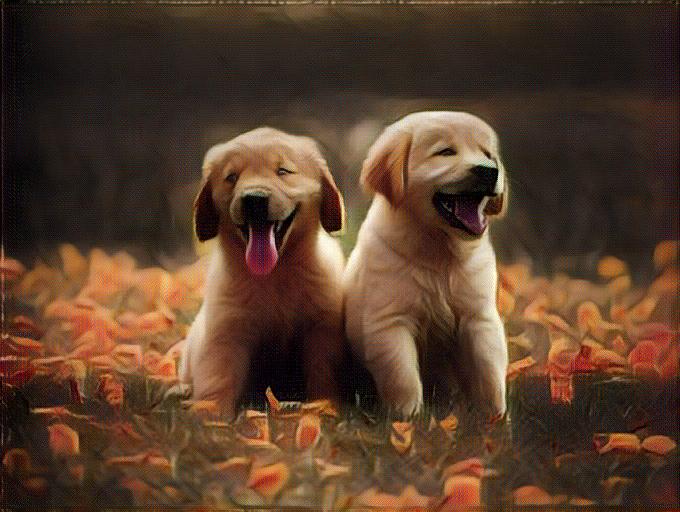
Baroque painting turns light into drama. That makes it a natural match for dog portraits: a clear face, expressive eyes, textured fur and a simple pose can remain recognizable while deeper shadows and warmer painterly color change the mood.
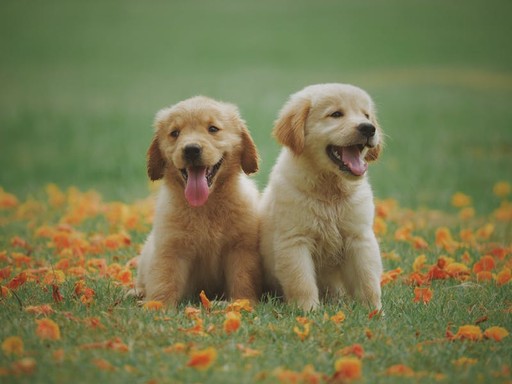
The example below is not a stock “after” image. It records one real ArtRobot style-transfer chain: the original dog photo, the exact public-domain painting used as the style reference, and the generated result.
Original + Style Reference + Generated Result
| Original dog photo | Baroque style reference | Generated result |
|---|---|---|
 |
 |
|
| Original input | Rembrandt, Old Man with a Gold Chain, 1631 | ArtRobot output |
The reference painting is Old Man with a Gold Chain by Rembrandt van Rijn, dated 1631 and supplied by the Art Institute of Chicago as a CC0 public-domain image.
The result keeps the two puppies, their pose and the flower field recognizable. At the same time, the transfer introduces darker framing, warmer brown-gold tones and a canvas-like painted surface. Those visible changes are why this image belongs on a Baroque page; a geometrically similar or randomly chosen painting would not be adequate evidence.
What the ArtFID Result Actually Means
For the measured Baroque × animals evaluation set, ArtRobot recorded:
| Metric | Measured value | What it checks |
|---|---|---|
| ArtFID | 186.12 | Combined content preservation and style-distribution distance |
| LPIPS | 0.3600 | Perceptual change between original and generated images |
| FID | 135.85 | Distance between generated results and Baroque references |
Lower values are better when comparisons use the same evaluation protocol. The 186.12 figure is the aggregate score for the Baroque animal test set—not a made-up score for this single image. It is useful for comparing styles tested on the same subject group, but it does not promise that every dog photo will achieve the same result.
Why Baroque Can Work for Dog Photos
Baroque artists used strong light-dark contrast, warm color and concentrated composition to direct attention. A dog portrait can offer the same useful structure:
- The eyes and muzzle give the transfer a clear focal point.
- Fur provides texture that can accept painterly color without losing the subject.
- A simple background leaves room for stronger shadow and atmosphere.
- Warm coats often sit naturally within Rembrandt-like brown and gold palettes.
The sample also shows a limitation. Fine facial details become softer, and the flower field becomes more abstract. If exact coat markings matter, start with a sharp, well-lit image and compare the generated preview before downloading a higher-resolution version.
Choose a Better Source Photo
Use a photo where the dog occupies most of the frame. Eye-level portraits usually preserve identity better than distant snapshots. Natural side light can help, but avoid crushed shadows because a Baroque transfer may darken them further.
For two or more dogs, leave visible space between faces and bodies. The example above works because both puppies have distinct silhouettes. Busy indoor backgrounds, motion blur and tiny faces make content preservation harder.
Try This Baroque Style on Your Photo
The link opens the product page with Baroque selected. Upload your own dog photo, review the standard result, and only choose a paid higher-resolution option if the preview suits the image.
Explore the Connected Topics
- Baroque Art Style — understand the movement, its lighting and its visual vocabulary.
- Pet Portrait Art Styles — compare alternatives before choosing a style.
- Best Art Styles for Portraits — learn which portrait characteristics affect style choice.
- Art Styles — browse styles currently available in the product.
These links connect the page by user intent: from a dog as the subject, to Baroque as the chosen look, to alternatives and finally to the creation tool.
Frequently Asked Questions
Can I turn my dog photo into a Baroque painting?
Yes. Use a clear dog photo and open the Baroque option from this page. The example above shows an actual recorded transfer rather than an unrelated illustration.
Is the displayed result generated from the original photo?
Yes. The left and right images are the input and output from the same recorded run. The center image is the Baroque reference used by the transfer pipeline.
Does ArtFID 186.12 apply to every dog photo?
No. It is the measured aggregate for the Baroque animal evaluation set. Individual results vary with lighting, crop, background and subject detail.
What kind of dog photo should I upload?
Start with a sharp eye-level image, a visible face and a relatively simple background. Avoid very dark photos and heavy motion blur.
Will the product page keep Baroque selected?
The creation link includes style_id=baroque, so the product page can preselect the same style instead of making you search for it again.
Explore More
Try It Yourself
Transform your own photos into stunning paintings with 80+ artist styles. Free to start.