
AI Artist & Tech Enthusiast
Portraits Fauvism Photo Effect — AI Art [ArtFID Tested]
![Portraits Fauvism Photo Effect — AI Art [ArtFID Tested]](https://storage.googleapis.com/artrobot-storage/blog/pseo/stylized_images/fauvism/portraits_01_stylized.jpg)
The portraits Fauvism photo effect transforms ordinary portrait photographs into explosively colorful paintings that channel the radical vision of Henri Matisse and Les Fauves — the artists whose work was so chromatically violent that a horrified critic at the 1905 Salon d'Automne dubbed them "les fauves" (the wild beasts). We tested this combination using ArtFID — the standard benchmark for neural style transfer quality — and the results are excellent: 239.32 ArtFID with a perfect 5-star rating, placing portraits at rank four out of 15 content types tested.
That fourth-place ranking reflects something fundamental about how Fauvism operates on the human face. This is a movement that replaced naturalistic skin tones with cadmium orange and viridian green, that flattened three-dimensional modeling into bold, flat color planes, and that treated every brushstroke as an emotional declaration rather than a descriptive act. When you apply Fauvism style transfer to a portrait photograph, you are not adding a filter. You are invoking a tradition that believed color itself could carry the full weight of human emotion — and the ArtFID data confirms that the neural network has absorbed that tradition with striking fidelity.
Portraits — Van Gogh Style Transfer

About Fauvism Art Style
Fauvism erupted onto the Parisian art scene in 1905 and burned with extraordinary intensity for approximately five years before its key practitioners moved on to other explorations. In that brief window, Henri Matisse, Andre Derain, Maurice de Vlaminck, and their circle produced some of the most chromatically daring paintings in Western art history — works that severed the connection between observed color and painted color with a decisiveness that shocked even the Post-Impressionists who had paved the way.
"Few artists have leaned more heavily and obviously on masters of the past—Raphael, Giorgione, Titian, Velazquez, Hals, Watteau, Chardin, Goya—yet made a clearer break with traditional ways of painting." — History of Art, p. 507
The movement's philosophical core was deceptively simple: color does not need to describe what the eye sees. A face can be green. A shadow can be vermillion. A background can be pure cobalt blue not because the sky behind the subject is blue, but because cobalt blue is what the painting needs at that point in its compositional architecture. Matisse articulated this most clearly — he was not painting what he saw but what he felt, and what he felt could only be expressed through color relationships that bore no obligation to optical reality.
 Henri Matisse, "Bathers by a River" — the monumental simplified forms and non-naturalistic color that define Fauvism's visual language. (Art Institute of Chicago, Museum Open Access)
"his mastery of two-dimensional design, for he maintains that painting is a flat surface and should remain a flat surface, animated by line, color, and texture." — Art Through the Ages, p. 735
What distinguishes Fauvism from the Expressionism that followed is its fundamental optimism. Where Munch and the German Expressionists used non-naturalistic color to externalize anguish and psychological distress, Matisse used it to externalize joy, sensual pleasure, and decorative exuberance. A Fauvist portrait does not torment the subject — it celebrates them in colors more vivid than life itself. This distinction matters for Fauvism style transfer: the results are bold and startling, but they are also warm, generous, and visually delightful.
Why Fauvism Works for Portraits Photos
Fauvism's compatibility with portraits is rooted in a specific technical relationship between the style's frequency profile and the structural characteristics of the human face. Fauvism operates in low frequency with bold color blocks — large, flat areas of saturated, non-naturalistic hue. Portraits, by contrast, contain mid-frequency facial features: the contours of eyes, nose, and mouth; the geometry of cheekbones and jawline; the directional flow of hair. When Fauvism meets a portrait, the style does not fight with the detail. It transforms color while preserving structure — replacing naturalistic skin tones and subtle shadow gradations with vivid, flat planes of pure color, while leaving the underlying facial architecture intact and recognizable.
This is precisely why portraits ranks fourth among 15 content types. Fantasy (182.6), travel (204.03), and still life (216.41) score marginally better because those subjects offer the neural network even more freedom in color transformation — a dragon or a market scene does not carry the same viewer expectation of recognizable identity that a face does. But portraits at 239.32 is a genuinely strong result, earning the same 5-star rating as those top three categories. The subject's identity is preserved. The emotional impact is amplified. The color transformation is dramatic without being destructive.
"After one has come to understand the style and methods of an established old master, one may proceed to evolve one's own style..." — The Pelican History of Art, p. 102
There is also a deeper reason Fauvism works so well for portraits. Matisse painted portraits throughout his career — from the shocking green stripe dividing his wife's face in "Portrait of Madame Matisse" (1905) to the simplified, almost abstract odalisques of his later years. The human face was central to his artistic project because it provided the ultimate test of his chromatic philosophy: could non-naturalistic color express something true about a person that naturalistic color could not? His answer, demonstrated across hundreds of paintings, was an emphatic yes. The neural network trained on these works has internalized that answer, and it applies it with consistency and conviction. Browse our best art styles for portraits guide for a comprehensive ranking.
ArtFID Quality Score: Portraits + Fauvism
ArtFID (Art-aware Frechet Inception Distance) is the standard benchmark for neural style transfer quality. It evaluates how well the artistic style was applied while preserving the original content structure. Lower scores indicate better results, and we convert raw scores into a 5-star rating for clarity.
Portraits + Fauvism: 239.32 ArtFID (5 Stars) — RANK #4 of 15
| Metric | Value |
|---|---|
| ArtFID Score | 239.32 |
| LPIPS (Perceptual Similarity) | 0.3689 |
| FID (Style Fidelity) | 173.83 |
| Star Rating | 5 / 5 |
| Content Rank | 4th out of 15 |
The LPIPS of 0.3689 indicates a confident perceptual transformation — your photograph is genuinely reimagined as a Fauvist painting, not merely saturated. The FID of 173.83 confirms authentic style fidelity: the output captures the wild color, simplified forms, and expressive brushwork that define Fauvism as a visual language.
Here is how Fauvism performs across all 15 content types:
| Content Type | ArtFID | Stars |
|---|---|---|
| Fantasy | 182.6 | 5 |
| Travel | 204.03 | 5 |
| Still Life | 216.41 | 5 |
| Portraits | 239.32 | 5 |
| Animals | 251.49 | 5 |
| Street Scenes | 277.14 | 5 |
| Flowers | 289.62 | 5 |
| Vehicles | 293.89 | 5 |
| Architecture | 299.23 | 5 |
| Landscapes | 302.63 | 4 |
| Interiors | 312.21 | 4 |
| Night Scenes | 320.71 | 4 |
| Food | 346.57 | 4 |
| Urban Scenes | 346.67 | 4 |
| Seascapes | 366.97 | 3 |
Nine of 15 categories earn the full 5-star rating, and portraits sits firmly in the upper quartile of that top group. The style shows broad strength — only seascapes drops below 4 stars — but portraits at 239.32 is notably stronger than the style's performance on landscapes (302.63), flowers (289.62), and even architecture (299.23), which is listed among Fauvism's historically weaker content types. For a dedicated breakdown of how Henri Matisse style transfer performs across all subjects, see our detailed analysis.
Before & After: Portraits in Fauvism Style
See the transformation for yourself. The three-column comparison shows the original photograph, the style reference painting used to guide the neural network, and the final AI-generated result:
| Original Portrait | Style Reference | AI Result |
|---|---|---|
|
 |
|
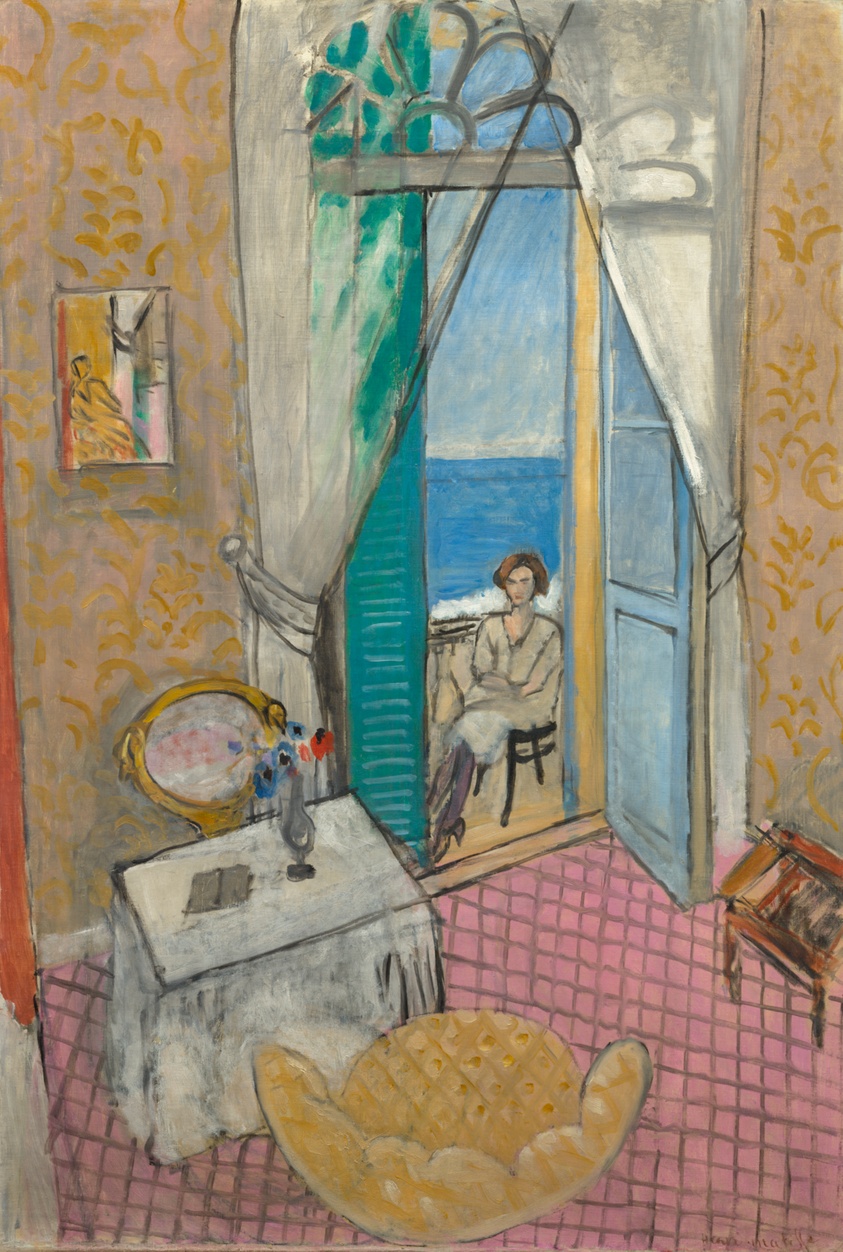
| Source photograph | Matisse, "Interior at Nice" (AIC, Museum Open Access) | Fauvism AI style transfer |
Technical breakdown:
| Metric | Value | What It Means |
|---|---|---|
| LPIPS | 0.3689 | Confident perceptual transformation — the result reads as a Fauvist painting, not a saturation filter |
| FID | 173.83 | Strong style fidelity — the output authentically captures Fauvism's non-naturalistic color language |
| ArtFID | 239.32 | Top-tier score — content faithfully preserved, style applied with chromatic boldness |
Notice how the transformation fundamentally reconfigures the portrait's color reality. Skin tones shift from photographic naturalism into vivid planes of pure hue — the warm oranges and unexpected greens that Matisse used to model the human face not through shadow and highlight but through color temperature and saturation. The background simplifies into broad, decorative fields of color that frame the subject without competing for attention — exactly the spatial strategy Matisse employed in his interiors, where patterned wallpapers and bright windows created chromatic environments that elevated rather than overwhelmed the central figure. Crucially, facial structure remains intact: the eyes, the line of the jaw, the expression — all preserved with fidelity while being reinterpreted through Fauvism's radical visual vocabulary. Explore how Georges Braque style transfer handles portrait subjects with a more geometric, proto-Cubist sensibility.
Photography Tips for Best Fauvism Results
Based on our ArtFID testing, here are practical recommendations for maximizing your Fauvism portrait results:
-
Use strong facial expressions. Fauvism amplifies emotional intensity through color. A smile becomes incandescent; a pensive gaze becomes hypnotic; even a slight frown gains dramatic weight when rendered in Matisse's non-naturalistic palette. The more expressive energy your subject projects, the more raw material the neural network has to transform into Fauvist emotion. Neutral, blank expressions produce weaker results because there is less psychological content for the color transformation to amplify.
-
Ensure good lighting contrast. Fauvism replaced traditional chiaroscuro with color contrast — Matisse modeled form not through light and shadow but through the juxtaposition of warm and cool hues. A photograph with strong directional lighting gives the algorithm clear structural information about the planes of the face, which it then reinterprets as bold color boundaries. Side lighting and Rembrandt lighting work particularly well. Flat, even illumination leaves the algorithm with less dimensional information to transform.
-
Avoid busy backgrounds. Fauvism simplified backgrounds into broad fields of color. A cluttered environment forces the neural network to process competing visual information, diluting the impact of the style transfer. A solid wall, a simple curtain, or open sky behind your subject allows the algorithm to do what Matisse did best — create a chromatic environment that serves the portrait rather than distracting from it.
-
Wear colorful clothing. This is specific to Fauvism and directly impacts results. The Fauves treated every element in the composition as an opportunity for chromatic expression. A red scarf becomes electric vermillion. A blue shirt becomes pure cobalt. Neutral clothing in grays and blacks gives the style transfer less color information to work with. Matisse's most compelling portraits feature subjects in vivid fabrics, and the neural network responds to the same chromatic richness.
-
Shoot at close to medium range. Extreme close-ups can lose the compositional balance that Fauvism depends on — the style needs enough of the figure and environment to create its characteristic interplay of color areas. A head-and-shoulders composition or a three-quarter portrait provides the ideal balance of facial detail and surrounding color field.
How to Apply Fauvism Style (3 Steps)
Applying Fauvism style to your portrait takes under a minute with ArtRobot's AI style transfer tool.
Step 1: Upload Your Portrait
Go to ArtRobot.ai and upload the portrait photograph you want to transform. JPEG, PNG, and WebP formats are all supported. For the best results, use a portrait with strong lighting contrast, an expressive face, and colorful clothing against a simple background.
Step 2: Select Fauvism Style
Choose Fauvism from the art style library. The style is trained on masterworks by Matisse, Derain, Vlaminck, and their Fauvist contemporaries. You can also explore the full portraits style transfer guide to compare Fauvism side-by-side with other period styles.
Step 3: Generate and Download
Click generate and wait a few seconds for the neural network to process your image. Download the full-resolution result and use it however you like — print it, share it on social media, or frame it as a piece of art. New users receive free credits, so there is no financial commitment required to see what your face looks like through Matisse's wild, revolutionary eyes.
FAQ
How does Fauvism style transfer work on portraits photos?
Fauvism style transfer uses a neural network trained on masterworks from the movement — primarily by Henri Matisse, Andre Derain, and Maurice de Vlaminck — to re-render your portrait photograph in the visual language of early 20th-century Fauvist painting. The algorithm replaces naturalistic color with bold, non-naturalistic hues while preserving the structural identity of your subject. Skin tones become vivid color planes, backgrounds simplify into decorative fields, and brushwork gains the expressive, gestural energy that earned these painters their "wild beast" reputation.
What ArtFID score does Fauvism get on portraits?
Fauvism achieves an ArtFID score of 239.32 on portraits, earning a perfect 5-star rating. This ranks fourth out of 15 content types tested — a strong upper-tier position. The LPIPS of 0.3689 and FID of 173.83 confirm both meaningful perceptual transformation and authentic style fidelity. Fantasy (182.6), travel (204.03), and still life (216.41) score marginally better, but portraits is firmly within the 5-star group.
Is Fauvism a good choice for portraits photography?
It is an excellent choice. Portraits score 239.32 ArtFID with a 5-star rating, ranking fourth out of 15 content types. Fauvism was deeply invested in portraiture — Matisse's green-striped portrait of his wife, his odalisques, and his late paper cut-out figures all demonstrate the movement's commitment to reimagining the human form through radical color. The style's low-frequency bold color blocks complement the mid-frequency detail of facial features, transforming color without destroying structure.
What portraits photo tips improve Fauvism results?
Use strong facial expressions to give the algorithm emotional content to amplify. Ensure good directional lighting contrast for clear facial structure. Avoid busy backgrounds — the style simplifies them into color fields. Wear colorful clothing so the style transfer has rich chromatic material to work with. Shoot at close to medium range for optimal compositional balance.
Can I try Fauvism portraits style transfer for free?
Yes. ArtRobot provides free credits to every new user, so you can upload a portrait and apply Fauvism style transfer without any payment. Visit ArtRobot.ai to start immediately.
Related Portraits Styles
- Portraits Style Transfer Guide — comprehensive comparison of all art styles tested on portrait photography
- Fauvism Style Transfer — Fauvism performance across all content types
- Best Art Styles for Portraits — top-performing styles ranked by ArtFID score
- Henri Matisse Style Transfer — the founder of Fauvism whose radical color philosophy redefined portraiture
- Georges Braque Style Transfer — Fauvist turned Cubist, bringing geometric structure to expressive color
Try It Yourself
Fauvism earned 5 stars on portraits with a 239.32 ArtFID — ranking fourth of 15 content types and confirming what Matisse demonstrated over a lifetime of painting: that the human face becomes more expressive, not less, when liberated from the obligation to look the way it actually looks. In 1905, the critics called these painters wild beasts because they dared to paint a woman's face in green and orange. A century later, the neural network trained on their work applies that same chromatic daring to your photographs with remarkable fidelity and zero scandal. Upload your portrait to ArtRobot's Fauvism style transfer and discover what happens when a hundred years of color revolution meets your own face. Free credits included.
Try It Yourself
Transform your own photos into stunning paintings with 80+ artist styles. Free to start.