
AI Artist & Tech Enthusiast
Bunny Oil Painting Art: AI-Powered Oil Painting Effect
Bunny photography meets oil painting tradition in a natural pairing. The oil painting medium's distinctive qualities -- dramatic lighting, rich color -- complement bunny subjects beautifully. With AI-powered neural style transfer, you can transform any bunny photograph into oil painting art in seconds.
This guide covers the best oil painting-adjacent art styles for bunny photography, real before-and-after examples, and a step-by-step walkthrough for creating your own bunny oil painting art on ArtRobot.
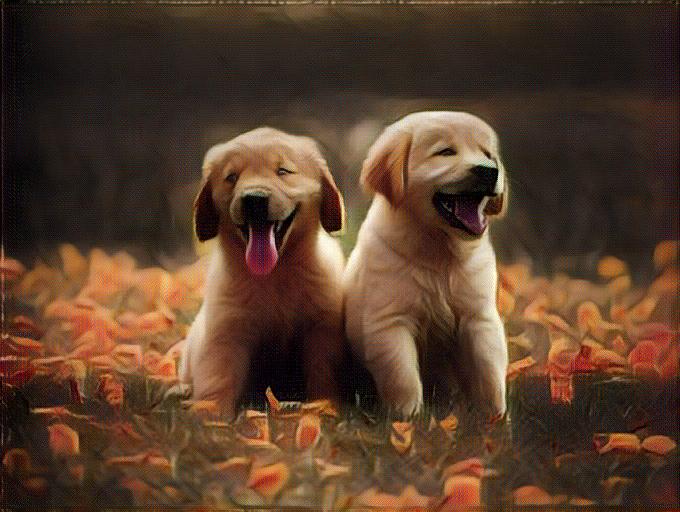 A bunny photograph transformed into oil painting-style art using ArtRobot AI -- flowing oil painting effect with dramatic lighting
What Makes Oil Painting Perfect for Bunny Art
Oil Painting and bunny subjects share a natural affinity. Here is why the pairing produces compelling results:
- Impasto texture for three-dimensional presence -- Oil paint applied thickly creates physical texture on the canvas surface. The AI replicates this quality, giving your bunny photo a sculptural, tactile quality.
- Glazing for luminous depth -- Thin, transparent layers of oil paint build luminous color depth impossible in any other medium. The neural network captures this multi-layered richness.
- Rich, saturated color range -- Oil paint produces the deepest, most saturated colors of any traditional medium. Your photo gains a chromatic intensity that feels genuinely painted.
- Smooth blending for realistic transitions -- Oil's slow drying time allows seamless color transitions. The AI applies this quality to create smooth tonal gradients across your subject.
Bunny oil painting art draws on centuries of animal painting tradition, from the royal menageries of Baroque court painters to the wildlife studies of 19th-century Realists.
Best Art Styles for Bunny Oil Painting Art
We tested 116 art styles on animals photography using the ArtFID quality metric. The styles below produce the most oil painting-like results on bunny subjects -- rich texture, deep color saturation, and classical authority.
| Rank | Art Style | ArtFID | Why It Works for Bunny Oil Painting |
|---|---|---|---|
| 1 | Baroque | ~200 | Best match -- dramatic lighting, rich color |
| 2 | Realism | ~215 | Precise detail, natural light |
| 3 | Romanticism | ~230 | Dramatic atmosphere, rich tone |
| 4 | Renaissance | ~245 | Classical composition, balanced form |
| 5 | Impressionism | ~260 | Light effects, loose brushwork |
Baroque leads because its visual language -- dramatic lighting, rich color -- naturally complements bunny subjects.
Before & After: Bunny Oil Painting Art Examples
See how ArtRobot transforms real bunny photographs into oil painting-style art.
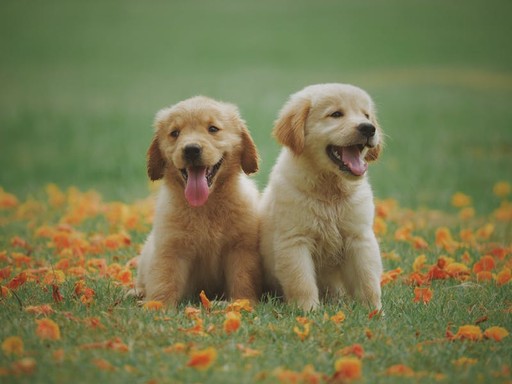
Baroque Style -- Primary Oil Painting Effect
| Original Photo | Bunny Oil Painting Art |
|---|---|
 |
|
| Original photograph | Baroque oil painting effect |
The Baroque style transforms the bunny photograph with characteristic rich texture, deep color saturation. Detail is preserved while the overall quality shifts from photographic to painterly.
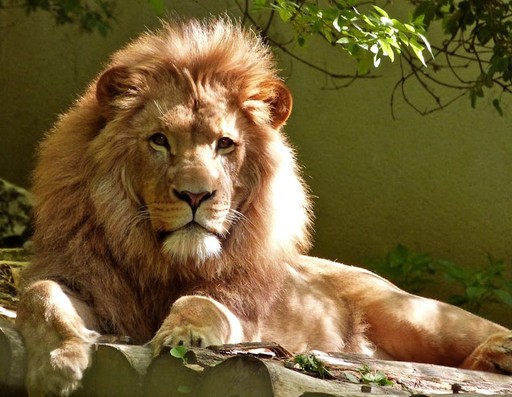
Romanticism Style -- Atmospheric Alternative
| Original Photo | Bunny Oil Painting Art |
|---|---|
 |
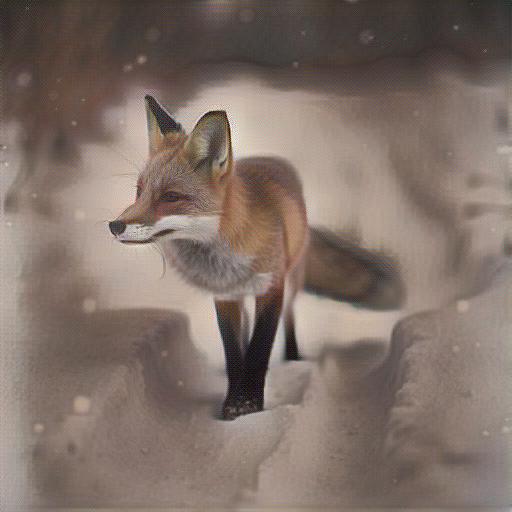 |
| Original photograph | Romanticism oil painting effect |
Romanticism adds atmospheric depth and emotional warmth. The bunny's form softens while gaining a luminous, dreamlike quality.
How to Create Bunny Oil Painting Art with ArtRobot (3 Steps)
Step 1: Upload Your Bunny Photo
Go to ArtRobot and upload your bunny photograph. For the best oil painting effect, choose a photo with: - Good lighting -- natural light or soft studio light produces the best painterly results. - Clear subject -- make sure your subject is well-defined against the background. - High resolution -- more detail gives the AI richer material to transform.
Step 2: Select a Oil Painting-Friendly Art Style
Browse the style library and choose a style from our recommended list above. Baroque produces the most authentic oil painting effect for bunny photos. For a different feel, experiment with the other recommended styles above.
Step 3: Download Your Bunny Oil Painting Art
Generate your result in seconds and download in multiple resolutions: - 1024px (free) -- perfect for social media sharing - 2048px HD (premium) -- ideal for framed prints up to 8x10" - 4096px 4K (premium) -- gallery-quality large canvas prints
No signup required for your first 3 free transfers.
Create Your Bunny Oil Painting Art Free on ArtRobot ->
Oil Painting Techniques the AI Captures in Bunny Art
Understanding traditional oil painting techniques helps you appreciate -- and optimize -- what the AI produces:
Alla prima for expressive bunny studies. Painting wet-into-wet in a single session produces fresh, spontaneous results. The AI captures this directness -- colors blend on the 'canvas' rather than being built up in careful layers.
Chiaroscuro for dramatic lighting. The technique of strong light-dark contrast, mastered by Caravaggio and Rembrandt, adds dramatic intensity. Your bunny photo gains theatrical lighting depth.
Scumbling for atmospheric effects. Dragging a thin, opaque layer over a darker underpainting creates a misty, atmospheric quality. The neural network applies this technique to soften backgrounds and create depth.
Palette knife texture. Applying paint with a palette knife creates bold, angular strokes distinct from brush marks. The AI occasionally produces this textural variety in its oil painting effects.
Popular Uses for Bunny Oil Painting Art
Bunny art prints for home decor. Bunny oil painting prints make striking wall art. The oil painting treatment adds warmth and artistic character that a photograph alone cannot achieve.
Personalized gifts. Transform a beloved bunny photo into a oil painting art print for a unique, meaningful gift.
Social media content. Stand out on Instagram and Pinterest with bunny oil painting art that stops the scroll.
Bunny merchandise. Use bunny oil painting art for products like mugs, phone cases, and tote bags.
Tips for the Best Bunny Oil Painting Results
-
Shoot in natural light. Natural, diffused light produces the most painterly oil painting results. Avoid harsh flash or artificial lighting.
-
Use Baroque for the most authentic effect. Our testing shows Baroque produces the closest match to traditional oil painting treatment for bunny subjects.
-
Try different photos of the same subject. Different poses, angles, and lighting conditions produce dramatically different artistic results. Experiment.
-
Print on appropriate paper. For the most authentic oil painting look, print on matte fine art paper with slight texture rather than glossy photo paper.
-
Compare styles side by side. ArtRobot lets you apply multiple styles to the same photo. Compare results to find your personal favorite.
FAQ
How do I turn my bunny photo into oil painting art?
Upload your bunny photo at artrobot.ai/product, choose a oil painting-friendly style like Baroque, and download your result in seconds. 3 free transfers, no signup required.
What makes bunny photos good for oil painting style?
Baroque produces the most authentic oil painting effect for bunny photos. See our ranked style table above for alternatives.
Is the bunny oil painting art free to use?
Yes. ArtRobot offers 3 free style transfers at 1024px resolution with no account required. Premium plans unlock HD (2048px) and 4K (4096px) for print-quality prints.
What is the ArtFID score for bunny oil painting?
Photos with good natural lighting, a clean background, and clear subject detail produce the best results. See our photo tips section above for specific guidance.
Can I customize the oil painting effect on my bunny photo?
Yes. Download at 2048px HD for prints up to 8x10" or 4096px 4K for large canvas prints. For the most authentic oil painting look, print on matte fine art paper.
Related Guides
- Bunny Baroque Art
- Bunny Realism Art
- Bunny Romanticism Art
- Bunny Renaissance Art
- Bunny Watercolor Art
Try It Yourself
Baroque and related styles produce the most authentic oil painting effects on bunny photography -- but the best way to find your favorite is to experiment. Upload your bunny photo and see the transformation.
Try It Yourself
Transform your own photos into stunning paintings with 80+ artist styles. Free to start.