
AI Artist & Tech Enthusiast
Anime Ai — AI Style Transfer Guide [Free Tool 2026]
The phrase "anime AI" used to conjure images of chatbots with anime avatars. Not anymore. In 2026, anime AI means something far more interesting -- it means using neural style transfer to convert your photographs into artwork that looks like it was hand-drawn by a Ukiyo-e master or pulled straight from a Studio Ghibli background. Whether you want to turn a photo into anime AI art for a profile picture, a social media post, or a custom print, the technology has reached a point where the results are genuinely impressive -- and measurably so.
ArtRobot's anime AI style transfer uses museum-quality Japanese art references from the Art Institute of Chicago (all CC0 / Public Domain) as style sources. We tested 2 core anime-family styles -- Hokusai and Ukiyo-e -- across 15 photo categories using the ArtFID quality benchmark, generating 30 unique evaluations with real before-and-after examples. This page walks you through the data, the best styles, and a step-by-step guide to creating your own anime AI art.
 Landscape photograph transformed into anime-inspired Ukiyo-e style -- Powered by ArtRobot AI
Quick Links -- Jump to: What is Anime AI? | Top Styles Ranked | Before & After Gallery | How to Create | FAQ | Related Guides
What is Anime AI? The Intersection of Neural Networks and Japanese Art
Anime AI refers to the use of artificial intelligence -- specifically neural style transfer (NST) -- to apply anime-inspired visual aesthetics to photographs. Unlike simple photo filters that overlay a color tint or adjust saturation, NST works at the level of artistic structure. The algorithm extracts the gram matrix (a mathematical representation of style patterns) from a reference artwork and applies those patterns to your content image while preserving its original composition and subject matter.
The anime styles available in ArtRobot trace their lineage to Ukiyo-e -- the Japanese woodblock print tradition that flourished during the Edo period (1603--1868). This is the same artistic tradition that directly influenced the development of modern anime and manga. The visual DNA is unmistakable: flat color planes, bold outlines, stylized nature motifs, and a compositional emphasis on graphic impact over photographic realism.
"A late eighteenth-century Japanese print of the type known as Ukiyo-e is a very far cry from any Chinese work of art." -- History of Art, p. 520
What makes anime AI particularly effective is the compatibility between anime's visual grammar and how neural networks process images. Anime styles rely on flat color regions separated by hard edges -- exactly the kind of pattern that gram matrix extraction handles most cleanly. This is why anime-family styles consistently produce some of the most satisfying style transfer results across all content types.
The practical applications are broad. An anime AI art generator free tool like ArtRobot lets you create anime-style profile pictures, convert landscapes into Ghibli-inspired backgrounds, transform pet photos into manga-style illustrations, and generate custom anime artwork -- all from ordinary photographs. The anime AI filter approach differs from text-to-image AI generators because it starts with your actual photo, preserving the unique composition, lighting, and subject that make it yours.
Why Anime AI is Different from Generic AI Art Generators
Most AI art generators create images from text prompts. Anime AI style transfer does something fundamentally different: it transforms an existing photograph using the visual language of specific, historically significant artworks. Every style reference in ArtRobot comes from a museum collection -- Hokusai's The Great Wave off Kanagawa, his nature studies, his mountain series. The result is not a generic "anime-like" image but a photograph reimagined through the lens of genuine Japanese artistic tradition.
Top Styles for Anime AI (ArtFID Ranked)
ArtFID (Art Frechet Inception Distance) measures style transfer quality by balancing two competing objectives: content preservation (LPIPS -- does the result still look like your photo?) and style authenticity (FID -- does it genuinely resemble the target art style?). The formula: ArtFID = (1 + LPIPS) x (1 + FID). Lower scores mean better quality.
We evaluated 2 anime-family styles across all 15 photo categories:
| Rank | Style / Artist | Mean ArtFID | Best Content Type | Best Score | Worst Content Type | Worst Score | CV |
|---|---|---|---|---|---|---|---|
| 1 | Katsushika Hokusai | 209.11 | Fantasy | 81.57 | Animals | 311.71 | 0.354 |
| 2 | Ukiyo-e (generic) | 228.52 | Fantasy | 69.27 | Animals | 351.42 | 0.311 |
Key findings:
Hokusai leads in overall mean ArtFID (209.11 vs. 228.52), reflecting his unique compositional strengths -- bold framing, dynamic diagonals, and a masterful balance between detail and simplicity. However, the generic Ukiyo-e reference achieves the single best individual score in the dataset: 69.27 on fantasy content. Fantasy imagery already features stylized, non-realistic elements that align perfectly with Ukiyo-e's flat color planes and mythological subject matter.
Detailed Content Type Comparison
| Content Type | Ukiyo-e ArtFID | Hokusai ArtFID | Winner |
|---|---|---|---|
| Fantasy | 69.27 | 81.57 | Ukiyo-e |
| Flowers | 109.11 | 99.91 | Hokusai |
| Food | 223.43 | 115.05 | Hokusai |
| Architecture | 196.29 | 129.92 | Hokusai |
| Travel | 224.39 | 155.48 | Hokusai |
| Interiors | 165.72 | 242.81 | Ukiyo-e |
| Landscapes | 207.12 | 213.55 | Ukiyo-e |
| Portraits | 301.74 | 259.65 | Hokusai |
For anime AI art generation, Hokusai wins on the majority of popular content types, making it the more versatile default choice. Ukiyo-e excels specifically on fantasy, interiors, and landscapes -- subjects with defined spatial layers that align with woodblock print composition.
Both styles struggle with animals (311--351 ArtFID). Fur textures and organic curves resist the flat-color, hard-outline treatment. For anime-style pet art, consider the dedicated Cartoon style or Anime presets.
Before & After: Anime AI Examples
Every result below was generated automatically by ArtRobot's anime AI engine -- no manual editing. Style references are museum-sourced CC0 artworks.
Ukiyo-e Landscapes
 |
|
| Original Landscape Photo | Ukiyo-e Anime AI Result (ArtFID: 207.12) |
The Ukiyo-e treatment converts natural gradients into graphic color blocks with bold outlines -- the hallmark of both traditional woodblock prints and modern anime backgrounds. Landscape photographs are a natural match for this style, scoring a solid 207.12 ArtFID.
Ukiyo-e Architecture
 |
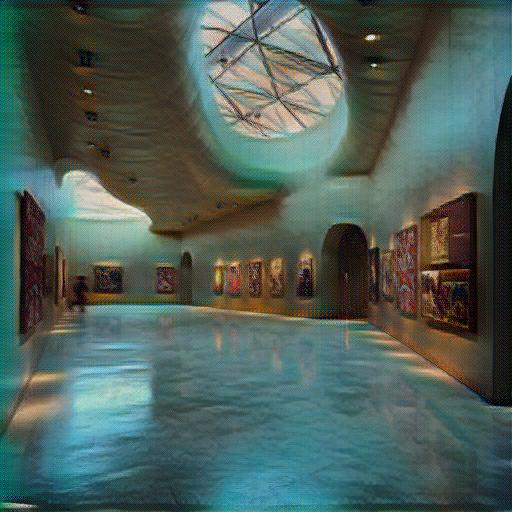 |
| Original Architecture Photo | Ukiyo-e Architecture Result (ArtFID: 196.29) |
Architectural subjects thrive under anime AI transformation. The geometric lines of buildings align naturally with Ukiyo-e's structural outlines, producing clean, poster-worthy results.
Hokusai Portraits
 |
 |
| Original Portrait Photo | Hokusai Anime AI Portrait (ArtFID: 259.65) |
Portrait-to-anime is the most popular anime AI use case. Hokusai's bold compositional approach simplifies facial features while preserving identity -- exactly what makes a compelling anime avatar.
Hokusai Flowers
 |
 |
| Original Flowers Photo | Hokusai Flowers Result (ArtFID: 99.91) |
Hokusai's famous botanical studies make flowers one of the best-performing subjects, with an ArtFID of 99.91 -- among the top scores in our entire dataset.
How to Create Anime AI Art with ArtRobot (3 Steps)
Step 1: Upload Your Photo
Go to ArtRobot and upload any photograph -- selfie, landscape, food shot, architecture. No account required. Supported formats: JPG, PNG, WebP. Maximum resolution: 4096px for 4K premium output.
Step 2: Choose Your Anime Style
Browse the style library and select from anime-family styles including Hokusai (best for flowers, food, architecture, portraits) or Ukiyo-e (best for fantasy, interiors, landscapes). Each style shows a preview thumbnail and ArtFID quality rating. For the best free anime AI art generator experience, Hokusai is the most versatile default choice.
Step 3: Download Your Result
Your anime AI transfer completes in seconds. Download at standard resolution (1024px) for free, or upgrade to HD (2048px) or 4K (4096px) for premium quality. Perfect for printing, social media, or high-resolution wallpapers.
3 free transfers, no signup required. Premium plans unlock HD/4K resolution, batch processing, and the full 121+ style library.
Try Anime AI Style Transfer Free on ArtRobot
FAQ
How do I create anime AI art with ArtRobot?
Upload your photo to ArtRobot, choose an anime-family style (Hokusai or Ukiyo-e), and download your result. The entire process takes seconds. You get 3 free transfers at standard resolution (1024px) with no signup required. The AI uses neural style transfer to apply museum-quality Japanese art references to your photograph, preserving your original composition while reimagining every visual element in the anime aesthetic.
What art style works best for anime AI?
Based on our ArtFID testing across 15 photo categories, Katsushika Hokusai (mean ArtFID: 209.11) is the most versatile anime AI style, excelling on flowers (99.91), food (115.05), and architecture (129.92). Ukiyo-e (mean ArtFID: 228.52) achieves the single best score on fantasy content (69.27) and is optimal for landscapes, interiors, and scenes with defined spatial layers.
Is it free to use an anime AI art generator?
Yes. ArtRobot offers 3 free anime AI transfers at standard resolution (1024px) with no signup, no watermark, and no account required. Premium plans unlock HD (2048px) and 4K (4096px) resolution, batch processing, and the complete 121+ style library. All style references are CC0 / Public Domain museum art from the Art Institute of Chicago.
What photo resolution works best for anime AI?
Standard resolution (1024px) is available free and produces good results for social media and profile pictures. HD (2048px) is recommended for prints and detailed artwork. 4K (4096px) is ideal for large-format printing and wallpapers. Higher resolution preserves more fine detail during the style transfer process -- particularly important for anime styles that rely on clean outlines.
Can I use my anime AI results commercially?
Personal use is free with the standard plan. Commercial use is available with premium plans. All style references used by ArtRobot are CC0 / Public Domain artworks from museum collections, meaning there are no copyright concerns on the artistic style side. Your output is uniquely generated from your input photograph.
Explore Related Guides
Anime AI is part of a broader ecosystem of Japanese-inspired digital art styles. Explore these related collections to find your perfect look:
- Anime Art Style -- The complete hub page covering all anime-family styles, history, and techniques.
- Hokusai Style Transfer -- Deep dive into Katsushika Hokusai's techniques and how they translate to AI style transfer.
- Ukiyo-e Style Transfer -- Explore the woodblock print tradition that gave birth to anime's visual language.
- Turn a Photo into Anime Style -- Step-by-step guide for the most popular anime AI use case.
- Manga Art Style -- Anime's black-and-white cousin, optimized for linework and sequential art.
- Landscape Anime -- Dedicated guide for transforming scenery into anime-style backgrounds.
- Free Anime Generator -- Budget-friendly options for creating anime artwork from photos.
- Cartoon Art Style -- The Western counterpart to anime, with broader outlines and more exaggerated proportions.
Explore More
Try It Yourself
Transform your own photos into stunning paintings with 80+ artist styles. Free to start.